
How AI automation saves businesses time and money
Where the hours actually go in a small business, which of those tasks automation can take over, and how to judge whether a workflow is worth building.
Read5 min read
Practical writing on what automation actually changes in a business, how AI agents work underneath, and how the systems in our portfolio were put together.
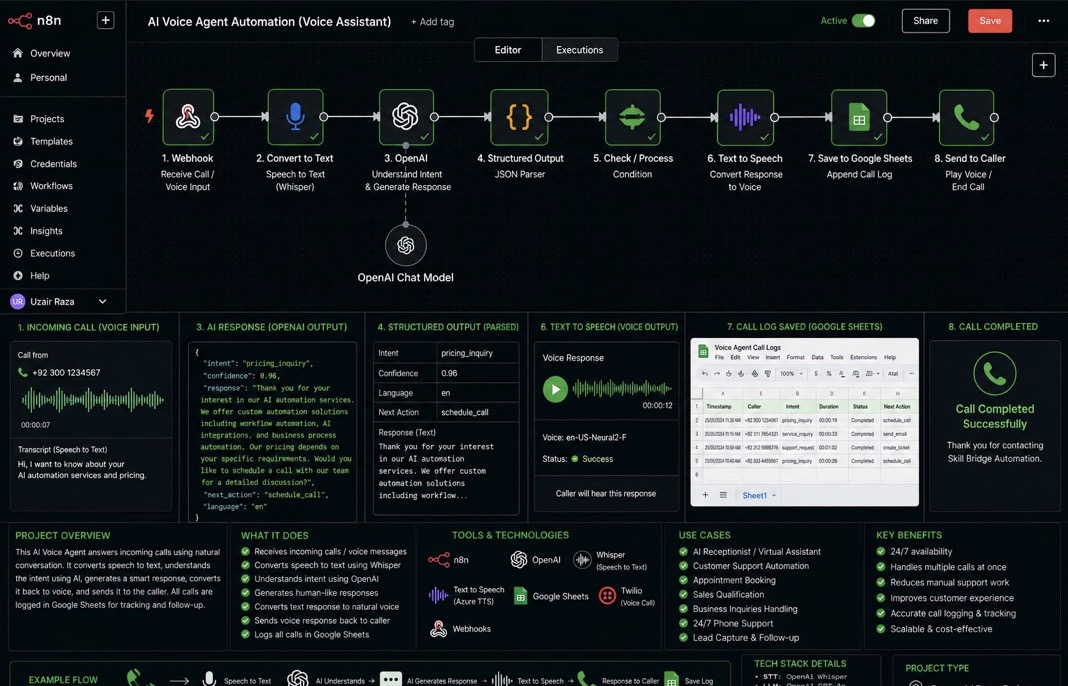
A walk through the full workflow: receiving a call on a webhook, transcribing it with Whisper, letting an OpenAI model decide the intent and write a reply, converting that reply back to speech, and logging the call so nothing is lost.
Where the hours actually go in a small business, which of those tasks automation can take over, and how to judge whether a workflow is worth building.
The difference between a scripted chatbot and an agent that interprets a request, acts on it, and knows when to hand the conversation to a person.
Most delays happen between tools, not inside them. A look at triggers, branching, syncing and the error handling that keeps a workflow trustworthy.
The repeating tasks behind every order, and how to automate support, stock alerts, order updates and content without losing the customer experience.
What a support agent needs to be useful: grounded answers, confidence scoring, a clear escalation path and a record of every conversation.
A phone line that answers itself, understands the caller and keeps a record of the conversation — built as one automation rather than a stack of products.
A business with a published phone number gets calls at inconvenient times: during a meeting, after closing, or three at once. Every unanswered call is a potential customer with no way in, and the answered ones leave no searchable trace of what was discussed.
The call reaches a webhook, which passes the audio to Whisper for transcription. That transcript goes to an OpenAI chat model with instructions to return a structured result: the caller's intent, a confidence score, a written response, the next action and the language. Because the output is structured rather than free text, the rest of the workflow can branch on it reliably.
A condition checks the parsed result and decides what happens next. The written response is converted to speech using a text-to-speech voice and played back to the caller, so the conversation continues in audio. In parallel, the call is appended to a Google Sheet with the timestamp, caller number, intent, duration, status and next action.
Automation pays off when it removes work that repeats. The skill is in spotting which work that is.
Look at a normal week and most of it splits into two kinds of work. There is the work that needs a person — deciding, negotiating, designing, understanding a customer's situation. And there is the work that follows a pattern: reading an enquiry and deciding where it goes, copying a form response into a spreadsheet, sending the same three-line reply, checking whether something arrived.
The second kind is where automation belongs. What has changed recently is that automation is no longer limited to rigid rules. A language model can read an unstructured email or form answer, work out what it means, and return a clean result the rest of the workflow can act on. That is the difference between "if the subject contains the word invoice" and "this message is a billing question with high urgency".
Time comes back in two forms. The obvious one is minutes per task. The bigger one is attention: a person who is not monitoring an inbox all day can concentrate on work that needs concentration. There is a cost saving too, but it is usually about capacity — handling more volume without adding headcount — rather than replacing anyone.
A fair test before building: write down how often the task happens, how long it takes, and what goes wrong when it is missed. If the answer to the last question is "we lose a customer", it is worth automating first.
An agent is software that understands a request, decides what to do about it, and does it.
A traditional chatbot follows a script. It matches keywords, offers buttons, and fails as soon as the person phrases things unexpectedly. An AI agent works differently: it interprets the message, forms an understanding of the intent, looks up whatever information it needs, and produces a response. When it has permission, it can also take an action — create a record, send an email, schedule something, notify a colleague.
Support is the common starting point, because the same questions repeat. Sales is next: an agent can qualify an enquiry, summarise it and route it to the right person while the lead is still warm. Voice is the newest area — an agent that answers the phone, transcribes the caller and replies in speech.
The boundary matters as much as the capability. Decide up front what the agent may answer on its own, what it must escalate, and what it is never allowed to do. That boundary is what makes an agent safe to put in front of customers.
The slowest part of most processes is the gap between two tools.
A lead arrives in a form. Someone opens it, copies the details into a spreadsheet, messages a colleague, and adds a reminder to follow up. None of those steps is difficult, but together they add hours across a week and every one is a chance to forget something.
Workflow automation replaces the gap with a defined path. A trigger starts the flow — a form submission, a new email, a scheduled time. The data is validated and formatted. Rules decide which branch it takes. The relevant systems are updated. The right person is notified. Every run is recorded.
Efficiency is the visible outcome, but consistency is the deeper one. A workflow does the same thing on a Monday morning and at midnight on a Friday, whoever is on holiday.
Growth in ecommerce usually means more of the same work, not different work.
Every extra order brings the same follow-on tasks: a confirmation, a shipping update, a "where is my order" message, a stock number to adjust, a review request. At low volume these are fine to do by hand. At higher volume they become the whole job, and they are the first things to slip during a busy period.
Automation should not make the store feel like a machine. Two rules help: automate the message that is genuinely the same every time, and always leave a visible route to a person. An automated reply that ends with a real way to reach support is a better experience than a slow human reply three days later.
Start with the single question your inbox receives most. Automating that one is usually enough to notice the difference in a week.
Support is the easiest place to start with AI, and the easiest place to get it wrong.
It is the easiest place to start because the questions repeat and the answers already exist somewhere — in a help doc, an old email thread, a guide nobody has updated in a year. It is easy to get wrong because a confident, incorrect answer damages trust faster than a slow one.
A question arrives from a chat widget, website form or inbox and is cleaned into a consistent structure. A model classifies it — intent, category, urgency — and drafts an answer from your documentation, returning a confidence score and the sources it used. Above a confidence threshold the answer is sent automatically. Below it, the question goes to a person with the draft attached. Either way, the exchange is written to a record and the team is notified.
Done properly, support automation clears the repetitive layer and leaves your team the conversations that actually need them.
Short, direct answers on AI automation, agents, workflows and what we can build.
AI automation is a process that runs by itself and uses artificial intelligence for the parts that need understanding. A traditional automation follows fixed rules; an AI automation can read an email, a form answer or a document, work out what it means, and then trigger the right steps — replying, filing, routing or alerting.
It removes the repetitive layer of work. Enquiries get sorted and answered as they arrive, data moves between tools without being retyped, and nothing waits for one person to be free. The practical result is faster response times, more consistent output, and the ability to handle more volume without adding headcount.
An AI agent is software that understands a request in natural language, decides what to do about it, and carries out the action. Unlike a scripted chatbot, it is not limited to keywords or preset buttons — it interprets the message, draws on your own information, produces a response and can escalate to a person when it should.
Yes, and support is usually the best place to start. An agent can answer common questions from your documentation, classify each conversation, log it for the team and hand over anything it is not confident about. We set a confidence threshold before launch so uncertain answers always reach a human.
Workflow automation connects the tools you already use so information moves between them automatically. A trigger starts the flow, the data is validated and formatted, rules decide the path, systems are updated and the right people are notified — with every run recorded.
Any business with work that repeats. Service businesses and agencies handling enquiries, ecommerce stores handling orders and questions, SaaS companies handling support, and small teams where one person is the bottleneck for a routine process.
Store events — a new order, a customer question, a stock change — trigger workflows that handle what follows. Confirmations and updates are sent, common questions are answered, inventory records are kept current, and marketing follow-ups go out on schedule. Your team stays in the loop for anything unusual.
Cloud architecture is the design of the infrastructure your systems run on: where workflows and applications are hosted, how services connect, how credentials and access are handled, and how the setup copes as usage grows. Good architecture is what keeps an automation reliable once real volume hits it.
Yes. Every build starts from your actual process and your actual tools rather than a template. Send us a description of the workflow on WhatsApp and we'll tell you what can be automated, how it would be structured and what it would involve.
Message us on WhatsApp. You'll get a straight answer about whether automation fits your situation.