Home About Services Projects Blogs Contact Book a free call on WhatsApp
WhatsApp 0303 3696969

Automations we've built, end to end.

Automations built in n8n — a trigger, an AI step that understands the input, structured output the rest of the flow can rely on, and actions that finish the job — alongside ecommerce store design and build work. The screenshots are the actual projects.

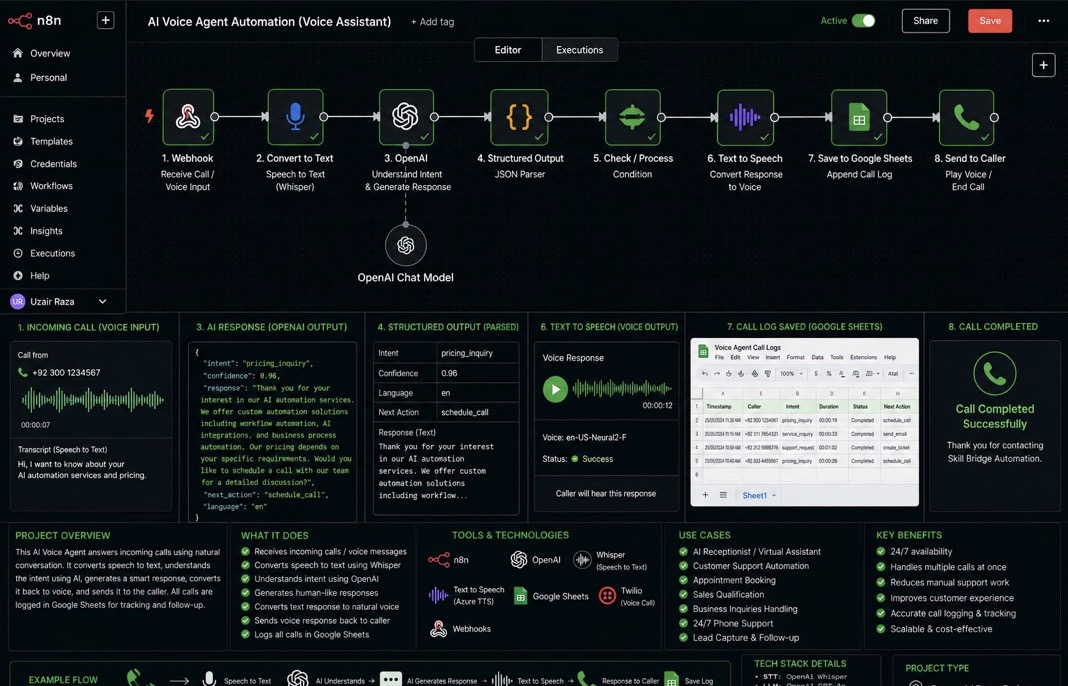
n8n workflow: webhook receives a call, Whisper converts speech to text, OpenAI understands intent and generates a response, text to speech converts it back to voice, the call is logged in Google Sheets and played back to the caller
AI Agents · Voice

AI Voice Agent

A phone agent that answers incoming calls in natural conversation, understands what the caller wants, replies in a generated voice and logs the whole exchange.

Webhook: call inWhisper: speech to textOpenAI: intent + responseStructured outputText to speechGoogle Sheets logVoice back to caller

The problem

Calls arrive outside working hours and during busy periods. Missed calls mean missed enquiries, and the ones that are answered rarely get recorded in a way anyone can search later.

The solution

The workflow receives the call through a webhook, transcribes the caller with Whisper, sends the transcript to an OpenAI chat model that returns the intent, a confidence score, a spoken response and a next action. The response is converted to audio with a text-to-speech voice and played back to the caller, while the call detail is appended to a Google Sheet.

Key features

  • Speech-to-text transcription of every call
  • Intent detection with a confidence score and language field
  • Human-sounding responses generated per call
  • Next action decided in the flow, such as scheduling a call
  • Automatic call log with timestamp, caller, intent, duration and status

Built with

n8nOpenAIWhisperAzure Text-to-SpeechTwilioGoogle SheetsWebhooks

Where it fits

AI receptionist, appointment booking, sales qualification on the phone, and after-hours support — with call tracking that stays searchable.
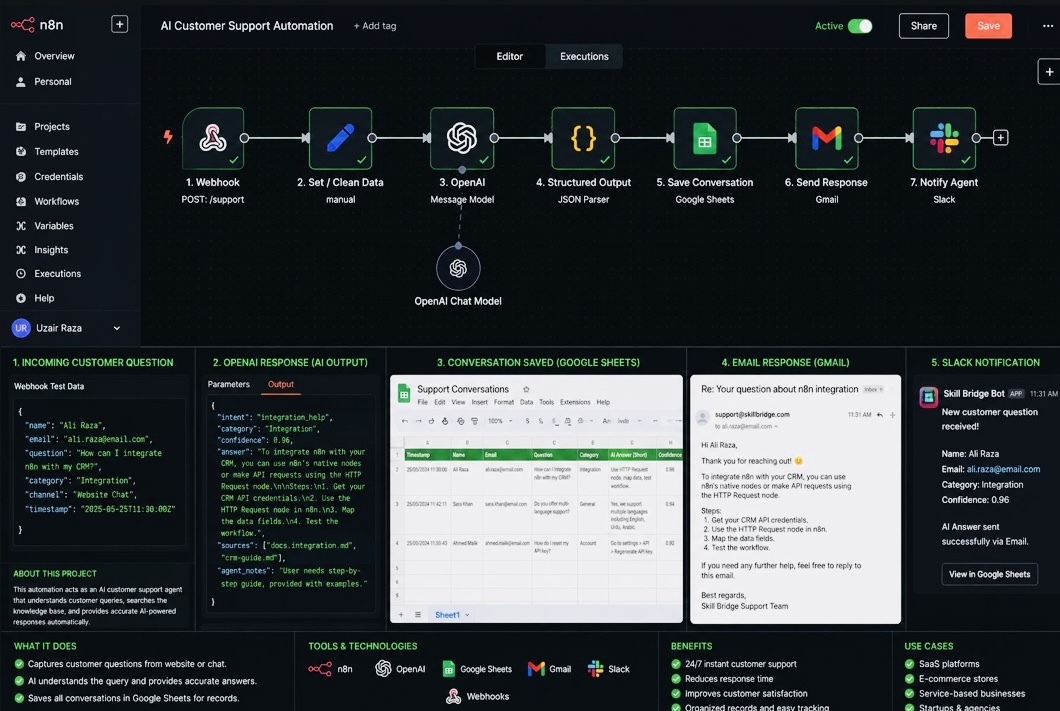
n8n workflow: webhook receives a support question, data is cleaned, OpenAI answers it, the structured result is parsed, the conversation is saved to Google Sheets, a reply is emailed and the team is notified in Slack
AI Agents · Support

AI Customer Support Agent

A support agent that takes questions from a website or chat widget, answers them from the knowledge base, emails the customer and keeps the team informed.

Webhook: /supportClean dataOpenAI: answerStructured outputSave conversationGmail replySlack notification

The problem

The same integration and how-to questions arrive every day. Each one waits for a team member, gets answered slightly differently, and then disappears from the record.

The solution

Questions come in through a webhook and are cleaned into a consistent shape. An OpenAI model classifies the intent and category, writes a step-by-step answer, returns a confidence score and cites the source documents it drew on. The answer is emailed back through Gmail, the full conversation is written to Google Sheets, and a Slack message tells the team what was asked and how confidently it was answered.

Key features

  • Intent and category classification on every question
  • Answers grounded in your own documentation with sources listed
  • Confidence score, so weak answers can be escalated
  • Conversation history stored in one searchable sheet
  • Slack alert with a direct link to the record

Built with

n8nOpenAIGoogle SheetsGmailSlackWebhooks

Where it fits

SaaS platforms, ecommerce stores, service businesses and agencies handling a steady stream of repeat questions.

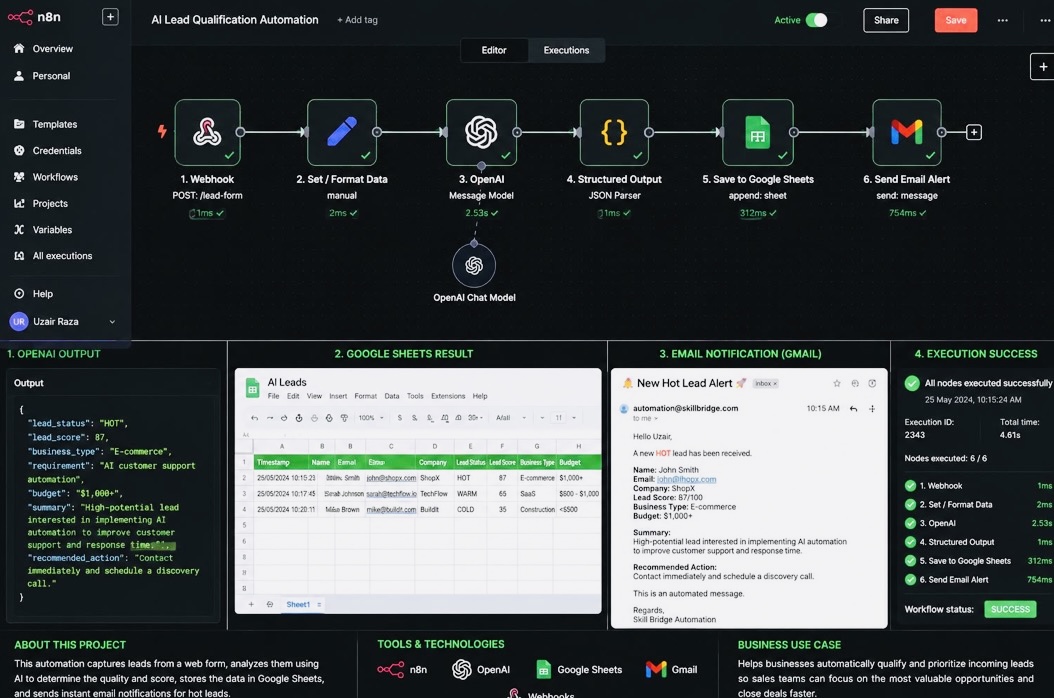
n8n workflow: lead form webhook, data formatting, OpenAI scoring, JSON parsing, append to Google Sheets and send an email alert for hot leads
Workflow Automation · Sales

AI Lead Qualification

Every form submission is scored, summarised and filed automatically, so sales spends its time on the leads that are actually ready.

Webhook: /lead-formFormat dataOpenAI: score & summariseJSON parserAppend to sheetEmail alert

The problem

Leads land in a form inbox with no priority attached. Someone has to read each one, guess how serious it is, and remember to follow up — usually hours later.

The solution

The form posts straight into the workflow. The data is formatted, then an OpenAI model returns a lead status of hot, warm or cold, a numeric score, the business type, the stated requirement, the budget range, a short summary and a recommended next action. The parsed result is appended to a Google Sheet, and hot leads trigger an immediate email alert with everything the salesperson needs.

Key features

  • Hot / warm / cold status plus a 0–100 score on every lead
  • Requirement and budget extracted from free-text answers
  • Recommended action written for the sales team
  • Central lead sheet with timestamp, company and status
  • Instant email alert on high-scoring leads only

Built with

n8nOpenAIWebhooksGoogle SheetsGmail

Where it fits

Agencies, B2B services and any team where enquiry volume is higher than the time available to read every one carefully.

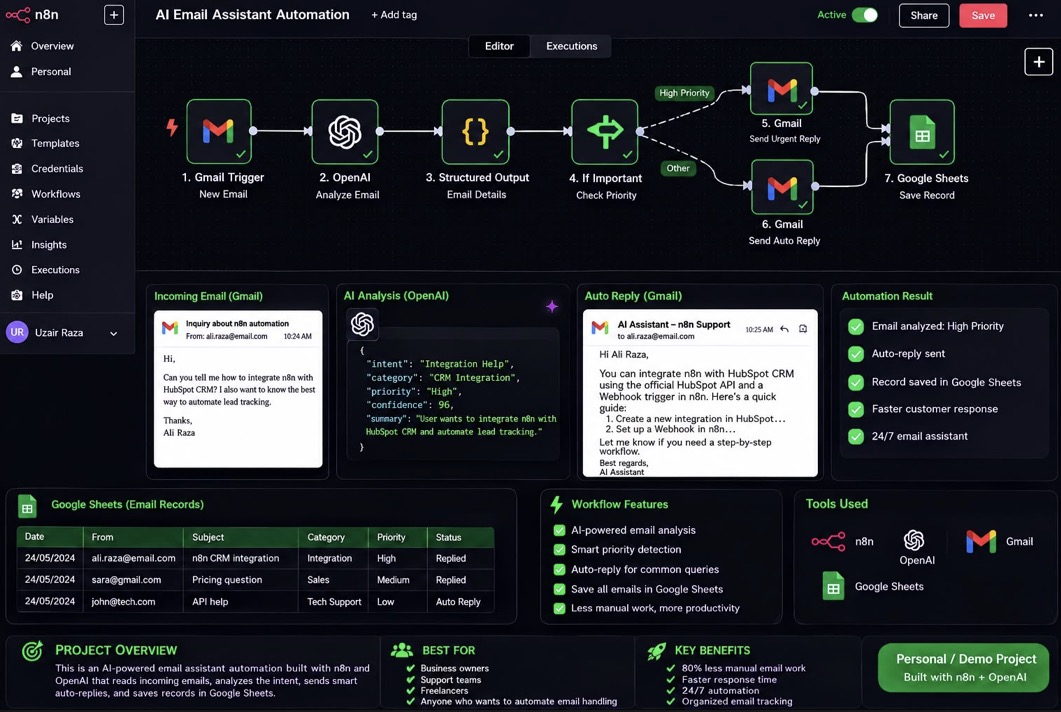
n8n workflow: Gmail trigger on new email, OpenAI analysis, structured output, priority check, urgent or standard auto reply, and a record saved to Google Sheets
AI Automation · Email

AI Email Assistant

An assistant that reads incoming mail as it arrives, decides how urgent it is, replies on the right path and keeps a record of everything.

Gmail triggerOpenAI: analyseStructured outputPriority checkUrgent or standard replyGoogle Sheets record

The problem

An inbox mixes urgent client questions with routine ones. Sorting them by hand takes attention all day, and the important message is often the one that waits longest.

The solution

A Gmail trigger picks up each new email and passes it to an OpenAI model, which returns the intent, category, priority, confidence and a one-line summary. A conditional step splits high-priority mail from everything else: urgent messages get an immediate reply on their own path, the rest receive a helpful auto-reply. Either way the email and its outcome are written to Google Sheets.

Key features

  • Automatic intent, category and priority detection
  • Separate handling paths for urgent and standard mail
  • Context-aware replies rather than a single canned message
  • Every email logged with date, sender, subject and status
  • Runs continuously, including outside working hours

Built with

n8nOpenAIGmailGoogle Sheets

Where it fits

Business owners, support teams, freelancers — anyone whose inbox is the main queue of incoming work.

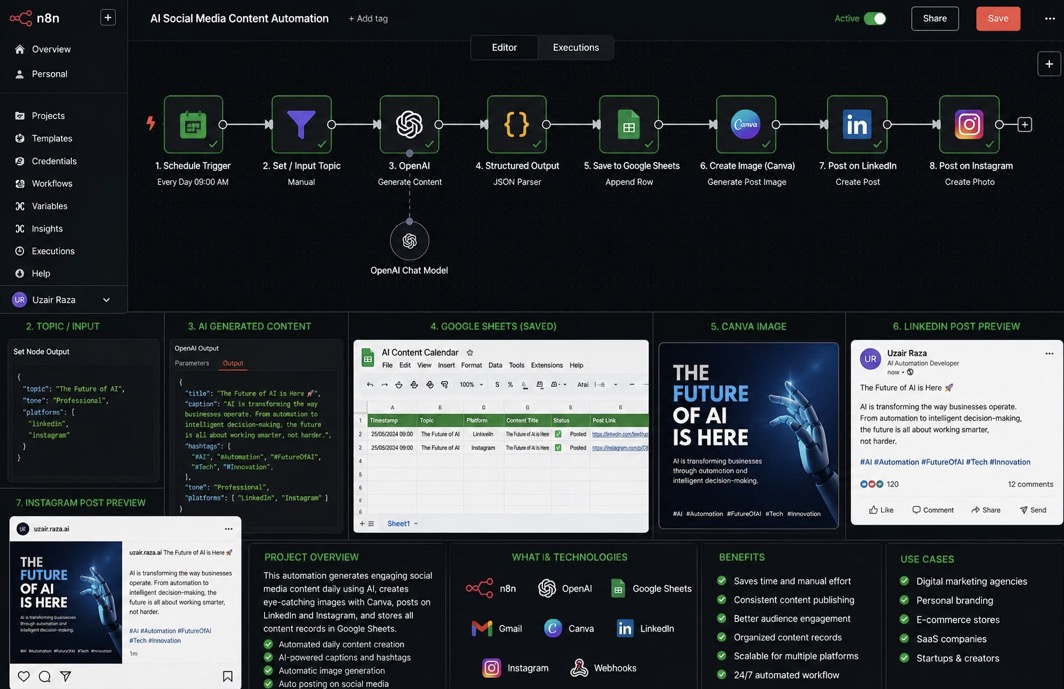
n8n workflow: daily schedule trigger, topic input, OpenAI content generation, JSON parsing, save to Google Sheets, Canva image creation, then posting to LinkedIn and Instagram
AI Automation · Marketing

AI Social Media Content Pipeline

A daily pipeline that writes the post, generates the image and publishes to LinkedIn and Instagram — with every piece of content recorded in a content calendar.

Daily 09:00 triggerTopic inputOpenAI: caption + hashtagsStructured outputContent calendarCanva imageLinkedIn + Instagram

The problem

Publishing consistently is a daily chore: think of a topic, write the caption, make an image, post it in two places, then remember what went out and when.

The solution

A schedule trigger fires each morning with a topic, tone and target platforms. An OpenAI model returns a title, caption and hashtag set formatted for each network. The parsed content is appended to a Google Sheets content calendar, an image is generated in Canva, and the post is published to LinkedIn and Instagram with the record updated to posted.

Key features

  • Scheduled daily content creation with no manual step
  • Captions and hashtags adapted per platform
  • Automatic image generation for each post
  • Content calendar with date, platform, status and link
  • Publishing to multiple channels from one run

Built with

n8nOpenAICanvaGoogle SheetsLinkedInInstagramGmail

Where it fits

Digital marketing agencies, ecommerce brands, SaaS companies, founders and creators building a personal brand.

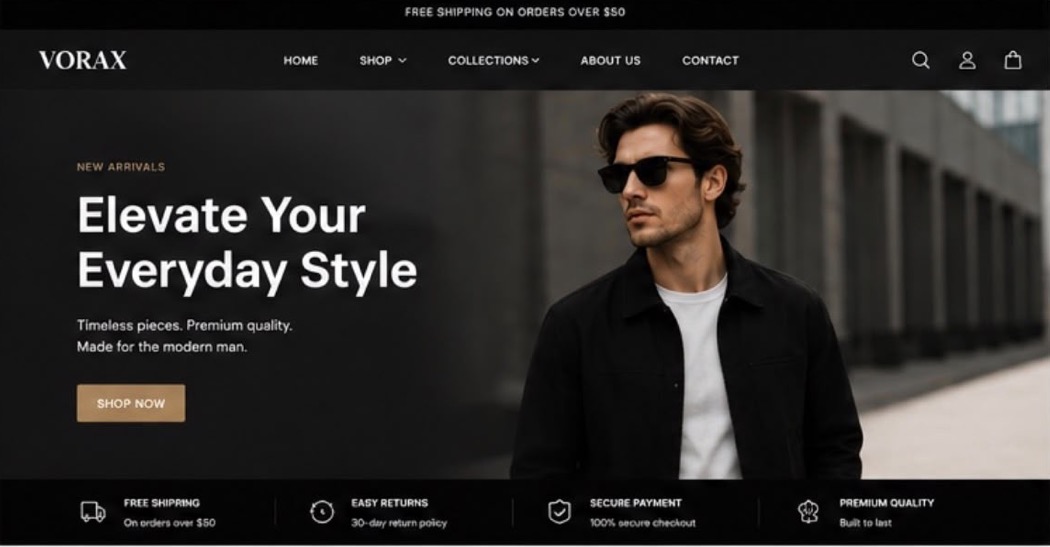
VORAX storefront: announcement bar, navigation with shop and collections menus, full-width hero with a New Arrivals headline and Shop Now button, and a trust bar covering shipping, returns, payment and quality
Ecommerce · Store Design & Development

Shopify Men's Fashion Store Design & Development

A complete modern Shopify storefront designed and built for VORAX, a men's fashion brand focused on premium everyday clothing and accessories.

Brand directionStore structureTheme designProduct & collection pagesCheckout flow

Overview

VORAX needed a storefront that matched the price point of the product. The design brief was a clean, premium aesthetic that establishes a clear brand identity and carries a customer smoothly from the first impression through product discovery to checkout.

The approach

The store was built around a dark, editorial layout with generous space and a single warm accent for calls to action, so the product photography stays the loudest thing on the page. Navigation was structured so a visitor can reach a category in one move, and the reassurance a first-time buyer looks for — shipping, returns, payment security — sits directly under the hero rather than buried in the footer.

Key features

  • Full-width hero with a single clear call to action into the catalogue
  • Announcement bar carrying the free shipping threshold on every page
  • Sticky navigation with shop and collections dropdowns for fast browsing
  • Search, account and cart always within reach in the header
  • Trust bar covering shipping, returns, secure checkout and product quality
  • Collection and product page layouts built for a growing catalogue
  • Responsive design that holds its structure on phones and tablets
  • A consistent visual identity carried from the homepage to checkout

Built with

ShopifyTheme designStore setupResponsive UI

Where it fits

Fashion, apparel and accessory brands launching or relaunching on Shopify; direct-to-consumer stores that need the storefront to look as considered as the product; and any retailer replacing a generic theme with a design that carries its own brand identity.

Your process could be next.

Send us the workflow that takes the most time in your week and we'll map out how it would run automatically.